
Introduction
If you’re planning to build a website, you’ve probably come across the term WordPress CMS. But what exactly is it, and why do millions of websites rely on it?
Whether you’re a blogger, small business owner, freelancer, or entrepreneur in India or the USA, choosing the right content management system can save you time, money, and frustration. The good news is that WordPress makes website creation accessible—even if you’ve never written a single line of code.
In this complete guide, you’ll learn what the WordPress content management system is, how it works, its biggest advantages, and whether it’s the right choice for your next website.
What Is WordPress CMS?
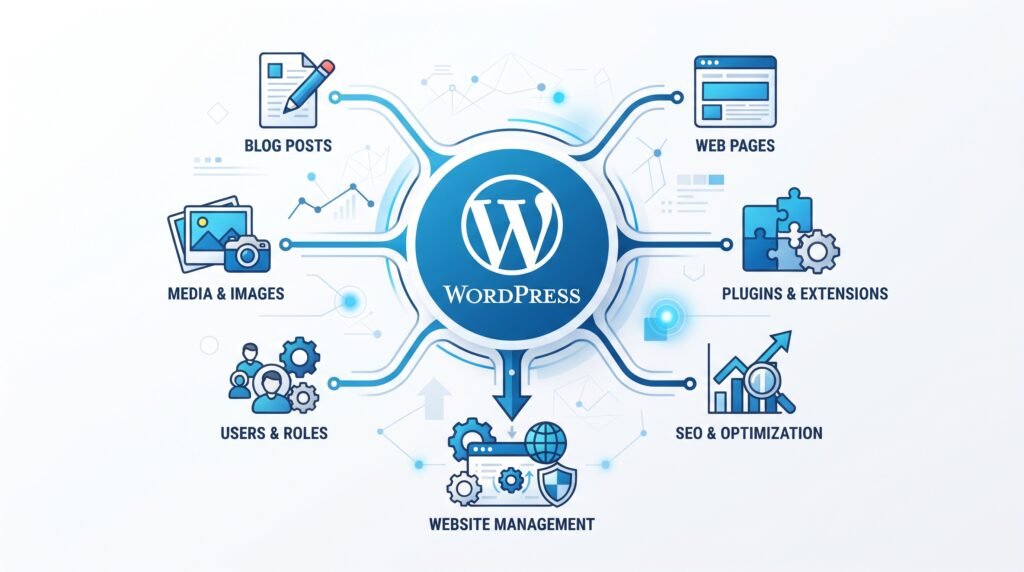
A WordPress CMS (Content Management System) is software that allows you to create, manage, edit, and publish website content without needing advanced programming skills.
Instead of manually coding every webpage, WordPress provides an easy dashboard where you can:
- Create pages
- Write blog posts
- Upload images
- Install themes
- Add plugins
- Manage users
- Customize your website
Today, WordPress powers over 40% of all websites on the internet [source needed], making it the world’s most popular CMS.
Is WordPress a CMS?
Yes.
Many beginners ask:
Is WordPress a CMS?
The answer is absolutely yes.
WordPress started as a blogging platform in 2003 but has evolved into a full-featured content management system capable of building almost any type of website.
You can build:
- Business websites
- Personal blogs
- eCommerce stores
- Portfolio websites
- Membership sites
- Online courses
- News websites
- Job portals
- Booking websites
- Forums
- Educational websites
Why Is WordPress So Popular?
There are several reasons why WordPress dominates the CMS market.
1. Easy to Use
You don’t need coding knowledge.
The dashboard is beginner-friendly, allowing anyone to publish content within minutes.
2. Open Source
WordPress is completely free.
Anyone can download, modify, and use it without paying licensing fees.
You only pay for:
- Hosting
- Domain name
- Premium themes (optional)
- Premium plugins (optional)
3. Highly Customizable
With thousands of themes and plugins, you can create almost any type of website.
Whether you’re opening a bakery in Mumbai or running a consulting business in New York, WordPress adapts to your needs.
4. SEO Friendly
Google loves websites that are:
- Fast
- Mobile-friendly
- Well-structured
- Regularly updated
WordPress makes implementing SEO best practices much easier through clean code and SEO plugins.
5. Massive Community Support
Millions of developers contribute to WordPress.
That means:
- Tutorials
- Forums
- YouTube videos
- Documentation
- Free themes
- Free plugins
are available whenever you need help.
WordPress CMS Features
Let’s explore the most important WordPress CMS features.
User-Friendly Dashboard

Everything is managed from one place.
You can:
- Publish articles
- Edit pages
- Manage menus
- Install plugins
- Moderate comments
without touching code.
Thousands of Themes
Themes control your website’s appearance.
Popular options include:
- Astra
- GeneratePress
- Kadence
- Blocksy
- OceanWP
Many free themes look professional enough for business websites.
Plugin Ecosystem
Plugins add extra functionality.
Examples include:
- SEO optimization
- Contact forms
- Online stores
- Membership systems
- Security
- Speed optimization
There are over 60,000+ plugins available [Click Here].
Responsive Design
Most modern WordPress themes automatically adjust for:
- Mobile
- Tablet
- Desktop
This improves user experience and SEO.
Media Library
Upload and organize:
- Images
- Videos
- PDFs
- Documents
using the built-in media manager.
User Roles
You can assign permissions such as:
- Administrator
- Editor
- Author
- Contributor
- Subscriber
Perfect for teams managing websites together.
How to Use WordPress CMS
Many beginners worry that learning WordPress is difficult.
In reality, you can launch your first website in just a few simple steps.
Step 1: Buy a Domain
Choose a memorable domain like:
- mybusiness.com
- myblog.in
Domains generally cost around:
- $10–15/year in the USA
- ₹700–₹1,200/year in India
Step 2: Purchase Hosting
Hosting stores your website online.
Entry-level hosting typically costs:
- $3–10/month
- ₹150–₹500/month
Many hosting providers include one-click WordPress installation.
Step 3: Install WordPress
Most hosting companies let you install WordPress with one click.
The setup usually takes less than five minutes.
Step 4: Choose a Theme
Install a theme that matches your business or blog.
Customize:
- Logo
- Colors
- Fonts
- Homepage
without coding.
Step 5: Install Essential Plugins
Recommended plugins include:
- SEO plugin
- Security plugin
- Backup plugin
- Cache plugin
- Contact form plugin
Only install plugins you actually need to keep your site fast.
Step 6: Publish Content
Create your first:
- Homepage
- About page
- Contact page
- Blog posts
You’re now ready to share your website with the world.
WordPress Website Builder Explained
Many people confuse WordPress with drag-and-drop website builders.
The WordPress website builder includes the Block Editor (Gutenberg), which lets you visually build pages using blocks.
You simply add:
- Text
- Images
- Buttons
- Columns
- Videos
- Galleries
without coding.
For even more design flexibility, page builders such as Elementor and Spectra are popular choices.
WordPress vs Other CMS
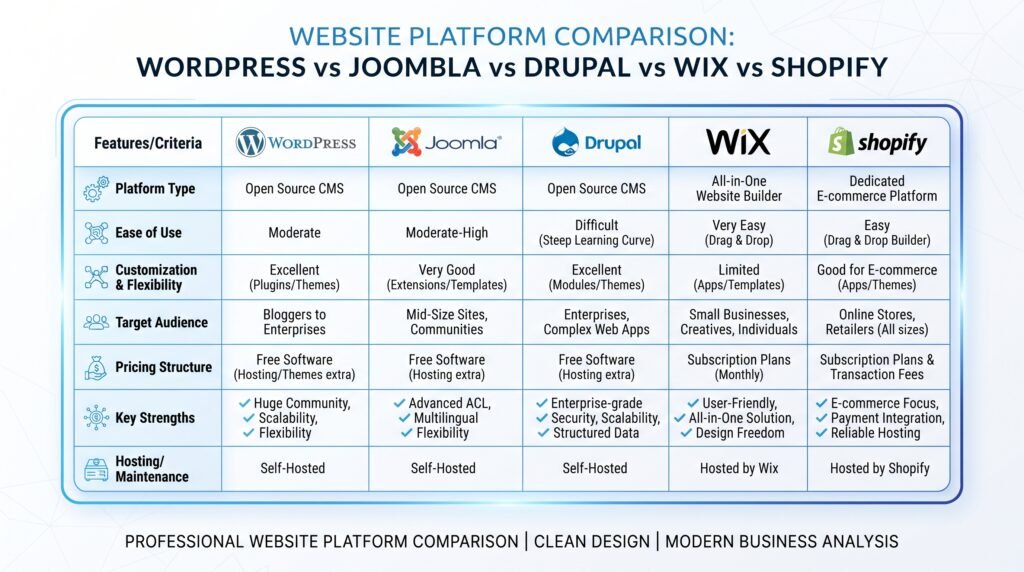
Choosing a CMS often comes down to comparing WordPress with alternatives.
| Feature | WordPress | Joomla | Drupal | Wix |
|---|---|---|---|---|
| Beginner Friendly | ✅ | Moderate | Difficult | Very Easy |
| SEO | Excellent | Good | Excellent | Good |
| Plugins | Huge Library | Medium | Limited | Limited |
| Flexibility | Excellent | Good | Excellent | Moderate |
| eCommerce | Excellent | Good | Good | Good |
| Ownership | Full | Full | Full | Limited |
| Learning Curve | Low | Medium | High | Very Low |
For most users, WordPress strikes the best balance between ease of use and flexibility.
Best CMS for WordPress Users
Technically, WordPress itself is a CMS.
However, if you’re asking whether WordPress is the best CMS, it stands out because it offers:
- Strong SEO capabilities
- Thousands of plugins
- Large community
- Affordable hosting
- Excellent scalability
- Easy customization
Unless you have highly specialized enterprise needs, WordPress is often the most practical choice.
Advantages of WordPress CMS
Beginner Friendly
Perfect for first-time website owners.
Cost Effective
You can launch a professional website with a relatively small budget.
Excellent SEO
SEO plugins simplify tasks like:
- XML sitemaps
- Meta descriptions
- Schema markup
- Internal linking
Scalable
Start with a simple blog.
Later, expand into:
- Online store
- Membership site
- Learning platform
without rebuilding your website.
Huge Marketplace
Thousands of developers create:
- Themes
- Plugins
- Integrations
making WordPress future-proof.
Disadvantages of WordPress CMS
No platform is perfect.
Some challenges include:
Regular Updates
Themes and plugins require updates.
Security
Because WordPress is popular, it’s a common target for attacks.
Using strong passwords, backups, reputable plugins, and security tools greatly reduces risk.
Plugin Quality Varies
Always choose plugins with:
- High ratings
- Frequent updates
- Active support
Who Should Use WordPress?
WordPress works well for:
Bloggers
Publish articles quickly.
Small Businesses
Create service websites without hiring expensive developers.
Freelancers
Build portfolios that showcase your work.
Online Stores
Use WooCommerce to sell products worldwide.
Agencies
Manage multiple client websites efficiently.